Take control of your spending and start saving for real.
For families, couples or flatmates — any home setup. No spreadsheets, no templates, no hassle. You enter your data, your expenses are yours. Free to start, no card required.
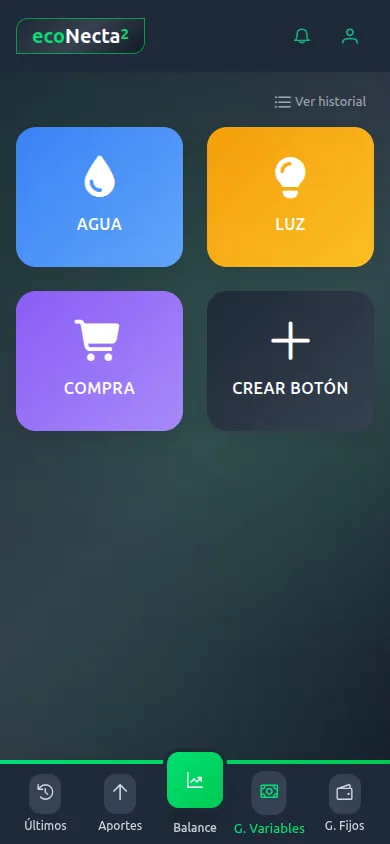
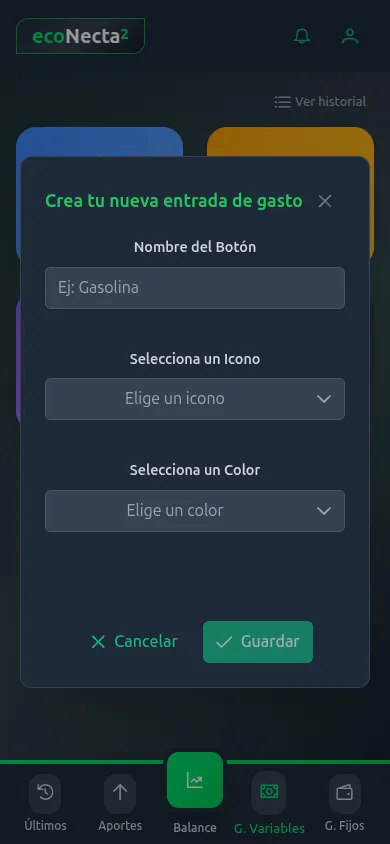
Custom buttons:
log any expense in 1 tap.
Forget opening menus, searching categories or typing names. Create buttons tailored to you — one for each expense type — and log any purchase with a single tap.
- Choose name, icon and colour for each button
- One tap → the form opens with the category pre-set
- Attach the receipt with your phone camera
- Everyone on the account sees the same buttons
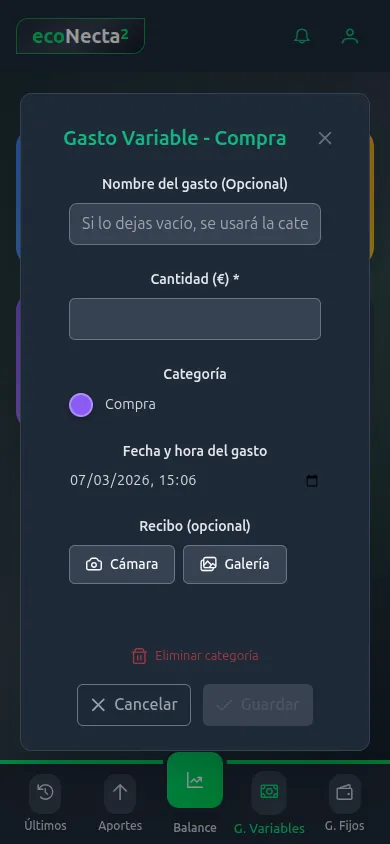
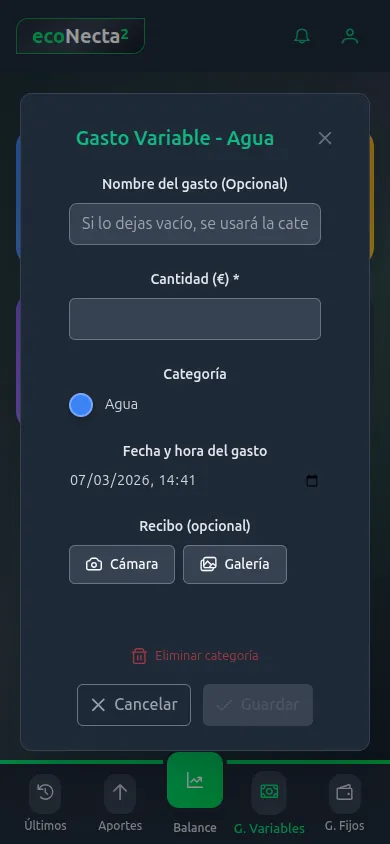
Log your receipts
with your phone camera
Open the camera, point at the receipt and the app reads the amount automatically via OCR. No typing needed: review the result and confirm with a single tap.
1. Open the camera
Tap the "Camera" button or pick a photo from your gallery.
2. Automatic reading
OCR detects the store name and the receipt total instantly.
3. Confirm & done
Review the data, tweak if needed and save the expense.
The receipt photo is attached as proof of purchase.
Savings goals that
actually work.
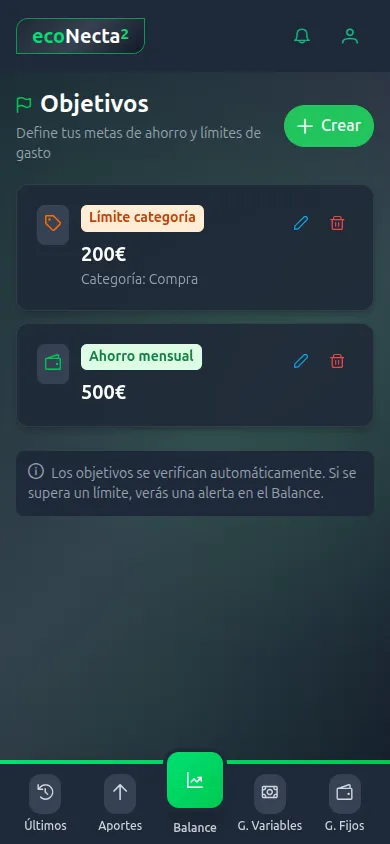
Set real targets and let the app warn you when something's off track. No need to check anything manually — ecoNecta2 does it for you.
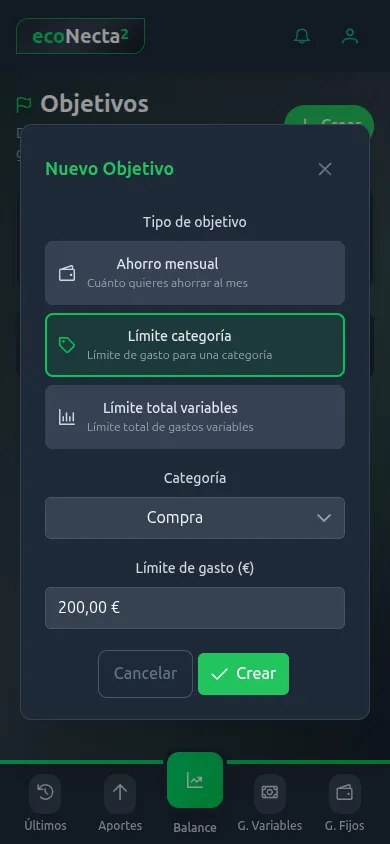
Monthly savings
Set how much you want to save each month and see progress automatically.
Category limit
Cap what you spend on supermarket, leisure or any category.
Total variable limit
Keep your total variable spending from spiralling each month.
Track your bills
without missing any
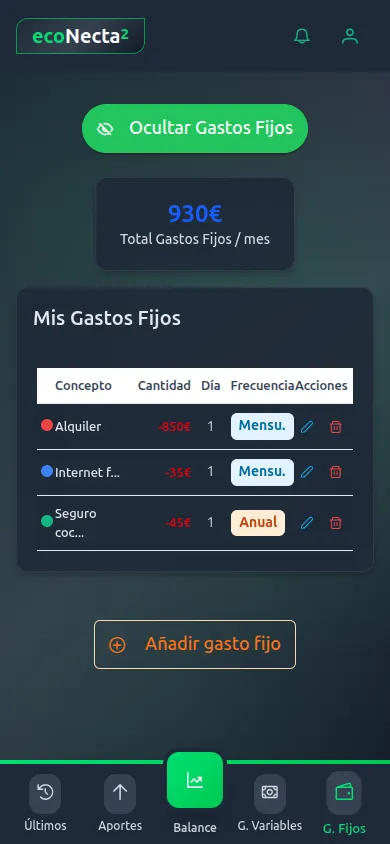
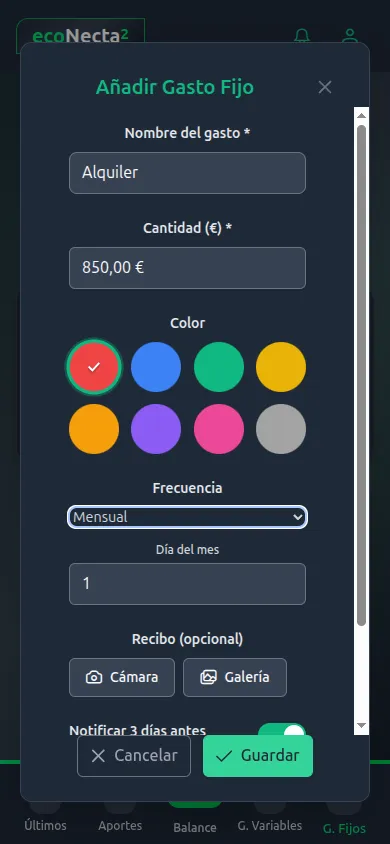
Log rent, insurance, subscriptions and any recurring expense. Choose the frequency, pick a colour and let the app remind you before it's due.
- Weekly, monthly or yearly frequency
- Custom colours for each expense
- Automatic monthly summary of fixed costs
- Attach receipts via camera or gallery
Get a reminder 3 days before each due date so you're never caught off guard.
Three steps and you're
saving.
No learning curve. In under a minute you're already tracking your expenses.
Create your expense buttons
Customise your variable expense categories: Supermarket, Fuel, Coffee, whatever you want. Each button has its own icon and colour. One tap = one expense logged.
Log an expense in 1 second
Tap the button, enter the amount and done. No menus, no category typing. You can also attach the receipt with your phone camera.
See your balance & hit your goals
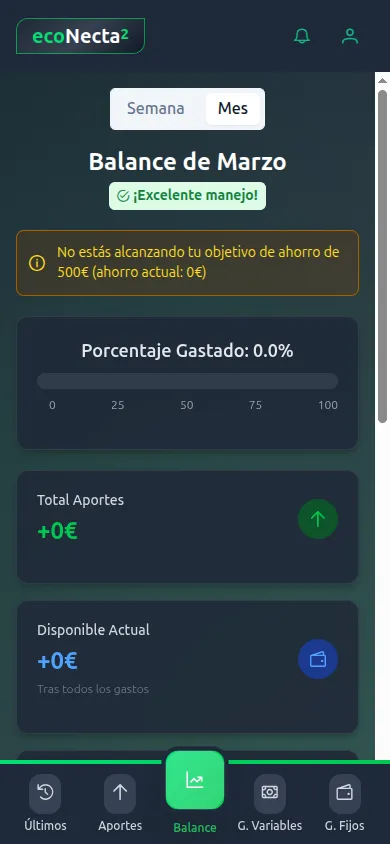
The monthly balance shows how much you've spent, how much is left and whether you're hitting your savings goals. All in real time.
Everything you need to save
every day.
No learning curve. No bank data. No complications. Ready to use from the very first minute.
Save with real goals
Set savings goals with a name, amount and date. Make contributions whenever you want and track progress in real time. The app reminds you how much is left.
Log an expense in 1 second
Custom buttons are your secret weapon. Create one for the supermarket, fuel or coffee. One tap and done — no menus, nothing to type.
For family, couple or flatmates
Invite everyone in your home. Each person has their own account and everyone sees the same data and goals in real time. No need to wait for anyone to fill you in.
Full control, no spreadsheets
Forget spreadsheets and templates. Fixed, variable expenses and monthly summary on a single screen. Everything categorised and updated automatically.
No bank data, ever
ecoNecta2 never connects to your bank and never asks for any financial data. You enter what you want to track — your data is yours and yours alone.
Built for mobile, always with you
Designed mobile-first so you can log an expense at the supermarket, a bar or anywhere. Nothing to install — just add it to your phone's home screen like any app.
Fully customisable
Variable expenses carry your name: you choose the categories. Quick buttons, recurring amounts, goals — everything adapts to how you live.
Day one ready, no learning needed
A clear, intuitive interface designed so anyone in the household can use it without explanation. If you can use a phone, you can use ecoNecta2.
Families already in control
of their finances.
"The custom buttons are brilliant. I used to spend 2 minutes logging an expense and now I do it in one second at the supermarket. My kids use it too."
María C.
Mum of two, Madrid
"We spent months with a shared spreadsheet nobody filled in. With ecoNecta2 everyone logs their own from their phone and we all see the balance. Zero arguments."
Javier P.
Flatmate, Barcelona
"The savings goals changed our lives. We set a €200 limit on leisure and for the first time we didn't go over. The alert stops you before you overspend."
Laura S.
Couple, Valencia
Start for free,
upgrade whenever you want.
No lock-in. Cancel anytime. All plans include all features.
Free
Perfect to get started with no commitment.
- Fixed expenses 6
- Quick buttons 6
- Users per account 3
- Accounts per user 3
- Receipt storage 100 MB
ecoNecta2
For families who want more control and flexibility.
- Fixed expenses 12
- Quick buttons 15
- Users per account 7
- Accounts per user 5
- Receipt storage 1 GB
ecoNecta2 VIP
No real limits. Ideal for large families or shared accounts.
- Fixed expenses ∞ Unlimited
- Quick buttons 25
- Users per account 10
- Accounts per user 8
- Receipt storage 5 GB
Secure payment via Stripe. VAT included. Cancel anytime from your account.
We answer your questions
before you start.
Yes. The Free plan has no expiry and lets you create up to 6 custom buttons, 6 fixed expenses and 3 users. No card or bank data required.
Never. ecoNecta2 doesn't connect to any bank. You manually enter the expenses you want to track. Your financial data never leaves your pocket.
You create buttons with any name, icon and colour (e.g. Supermarket, Fuel, Coffee). Tapping one opens the form with the category pre-selected. Just enter the amount and save.
Yes. Invite household members and each person signs in with their own account. Everyone sees the same expenses, contributions and goals in real time. Perfect for families, couples or flatmates.
You can create three goal types: monthly savings, category limit and total variable spending limit. The app automatically checks if you're on track and alerts you on the balance if you go over.
It's a PWA (Progressive Web App). No App Store or Google Play needed. Install it from your mobile browser in 30 seconds and it works like any other app, with its own home screen icon.
Ready to take control of
your family finances?
Create your free account in under 30 seconds. No credit card. No fine print.